

Your phone as webcam and microphone
Use your phone's camera and microphone in video calls on the Mac.
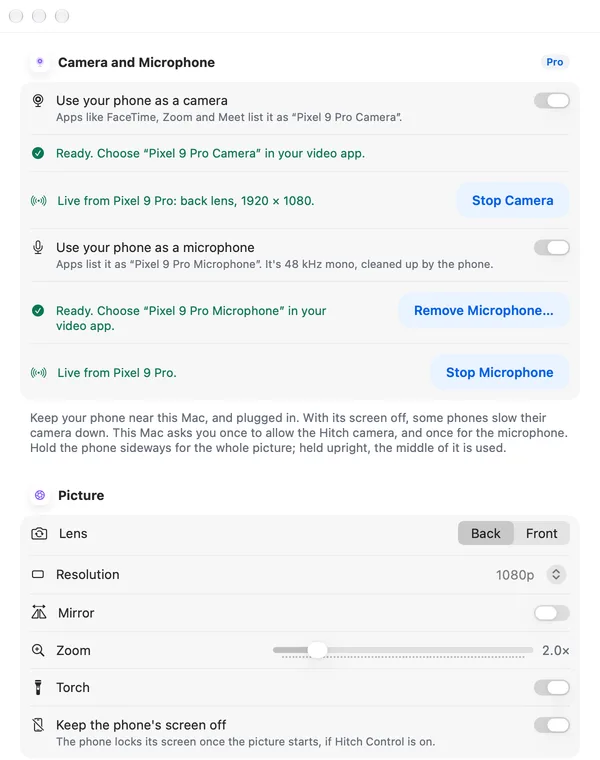
ProYour phone appears as a camera and a microphone that video-call and recording apps on the Mac can choose.
Every Pro feature free for 14 days. No card.
What it does.
Hitch adds a camera called after your phone, such as Pixel 9 Pro Camera, which FaceTime, Zoom, Meet, Teams, OBS and QuickTime can pick. Choose the front or back lens, 720p or 1080p, or 4K on phones that support it, mirror, zoom and the torch. You can also keep the phone's screen off.
A matching microphone, called Pixel 9 Pro Microphone, carries your phone's voice into any app that takes a microphone. It uses the phone's own noise suppression and echo cancelling where it has them.
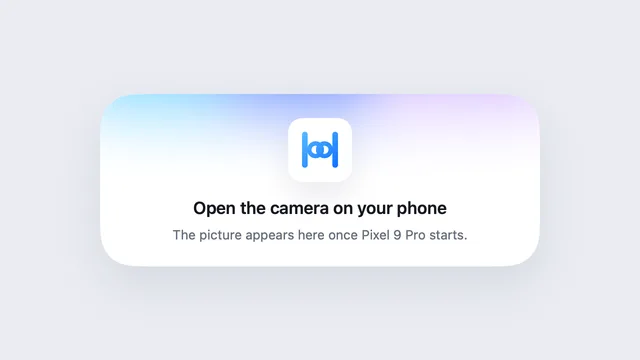
When the phone stops sending, the camera shows a still card asking you to open the camera on your phone, rather than going black.
How it works.
- 1
Turn it on
macOS asks you once to allow the camera, and once to allow the microphone. You approve them in System Settings.
- 2
Pick it in your app
Choose your phone's camera and microphone in the app's settings.
- 3
Prop up the phone
Keep it near and powered. A notification shows on the phone while it's in use, with Stop.
Every Pro feature free for 14 days. No card.
In the app.
Screenshots from Hitch, with sample names and data.
The limits, plainly.
- The phone must stay near and powered.
- With the screen off, some phones slow the camera down.
- The Mac needs your one-time approval for the camera and for the microphone.
- A family member's phone never streams its camera or microphone.
Try it in the Hitch beta.
Hitch is in a tester beta for Mac and Android. Ask to join, and we'll let you know when there's room.
Every Pro feature free for 14 days. No card.
Mac: macOS 15 or later · Phone: Android 10 or later · Developer settings: Not needed
